


A VGA fiber optic extender solves the problem of “the computer still outputs an analog picture, but the monitor is very far away.” It usually works as a paired transmitter and receiver to extend the video link; it does not turn an old picture into a higher resolution just because fiber is used, and it does not automatically provide video conferencing, network multicast, or remote keyboard and mouse functions. Only by understanding the three stages of input, internal processing, and output can you judge where a blurry picture actually occurs.
1. What Signals Does the VGA Connector Carry?
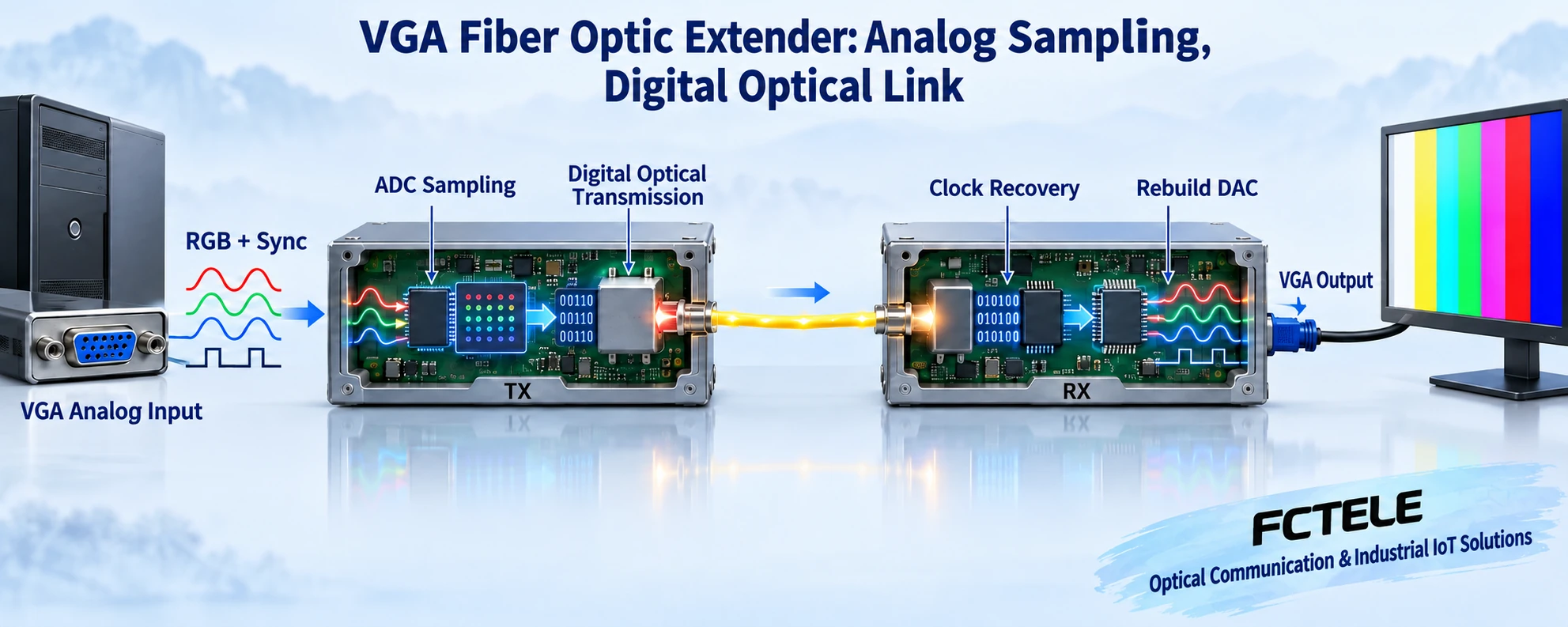
A common VGA connector has three rows with fifteen contacts in total. The red, green, and blue image channels are represented by continuously changing voltages, and there are also synchronization and display identification related lines. The color voltage represents the brightness at the current position, and synchronization tells the receiving device when a line starts and when a frame starts. Here, VGA means an analog video interface; it does not mean that only the earliest low-resolution modes can be displayed. The actually supported resolution, refresh rate, and synchronization form depend on the combined capabilities of the signal source, the fiber optic extender, and the monitor.
2. Why does the transmitter need to sample?
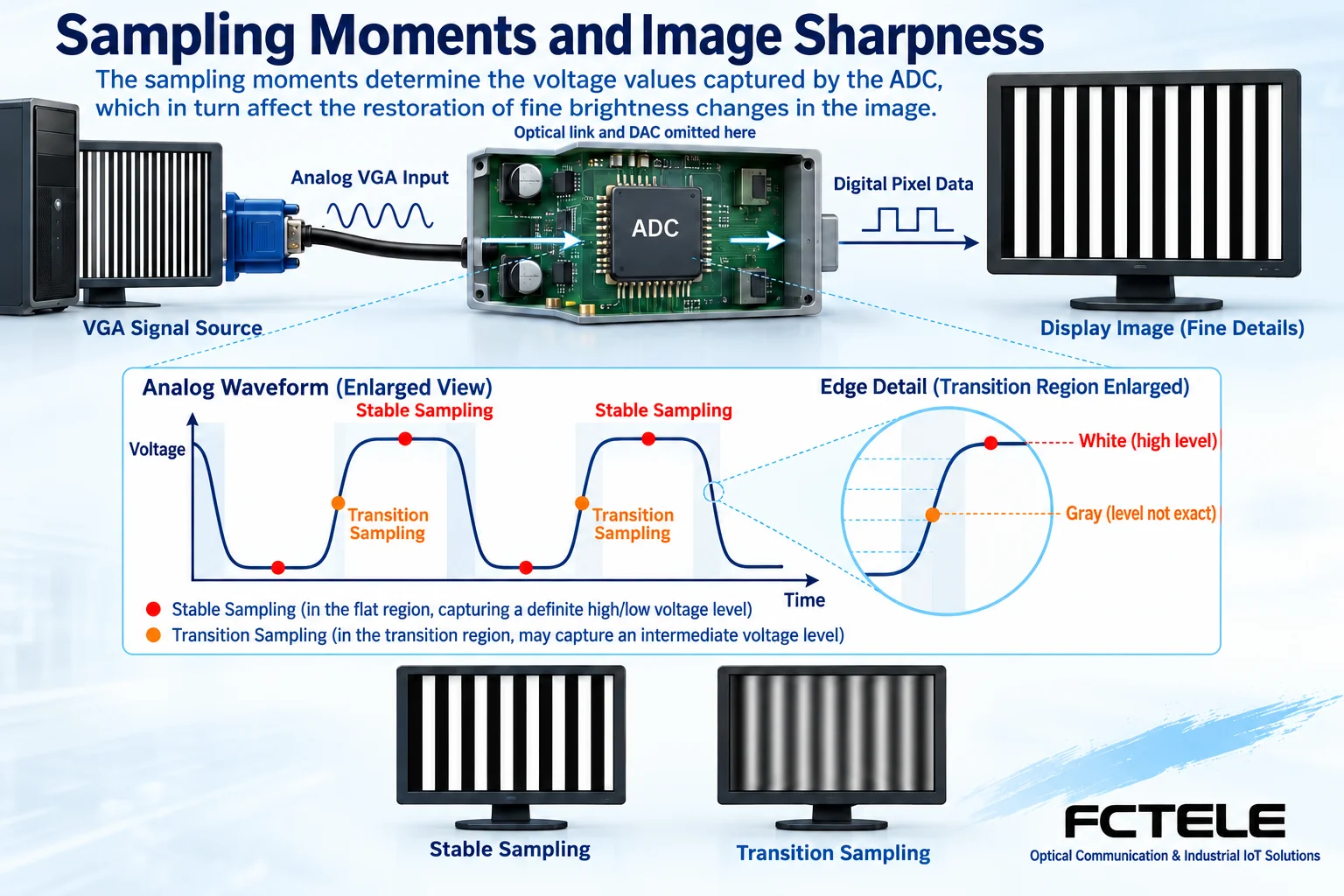
In a common digital fiber extension scheme, the input circuit first receives and conditions the analog voltage, and then an analog-to-digital converter turns the voltage into digital values at a certain rhythm. This process is called sampling. You can think of it as reading values along the color curve over time, but the position of the reading points is equally important: when a reading falls in a stable region, the color is easy to distinguish; when it is near a transition edge, an intermediate value may be read. After that, the device organizes the digital data and drives the optical transmitter circuit. What the fiber carries is an encoded signal, not a complete image floating in the fiber core.
3. How does the receiver restore the picture?
The receiving circuit restores the optical signal to an electrical signal, completes data and timing recovery, and then reconstructs the analog RGB and corresponding synchronization through digital-to-analog conversion and output circuits, sending them to the monitor. Different designs may use different packages, buffering, and control methods. The diagram expresses a common idea and does not prove that all products use the same chip. Sampling, processing, and propagation all take time; whether compression is used, whether a whole frame is buffered, and how large the delay is should be checked in specific documents and tests. It cannot be broadly written that “all VGA fiber optic extenders compress” or that there is “absolutely zero delay.”
4. Why do bandwidth and synchronization affect fine text?
The higher the resolution and the faster the refresh, the more pixels usually need to be processed per unit time; the blanking and synchronization intervals of lines and frames also occupy timing, so you cannot infer all requirements simply by multiplying the number of active pixels. Insufficient analog input bandwidth can make rapidly changing edges become gentler, and an unsuitable sampling clock or phase may make thin lines look faint. Public graphics acquisition chip documents explain that an RGB sampling circuit can use line synchronization to generate the sampling clock; this is only a principle basis, not proof that Feichang Technology products use that chip. Being able to light up the screen does not mean that small text, edges, and stability in that mode are already acceptable.
5. Why can fiber not fix blur that comes from the source?
If the computer has already scaled the picture before output, or if the long VGA cable before the transmitter has already weakened high-frequency detail, the optical link can only continue to carry the information it has already received. A fiber medium can reduce the effect of electromagnetic coupling on the line, but the power supplies, analog interfaces, grounding, and enclosures at both ends are still part of an electrical system. Fiber also does not equal encryption: the confidentiality of information also involves terminals, access control, and physical management. Promotional terms such as “high definition” and “anti-interference” need to be understood in the context of specific interface modes and test conditions, and they cannot replace acceptance testing of the whole link.
6. Picture, audio, and keyboard/mouse must be checked separately
VGA itself does not carry audio in the usual sense; if sound is needed, confirm whether the device has separate audio input and output. KVM is the combined extension or control function of keyboard, video, and mouse. Whether USB, PS/2, and the return direction are supported all need to be checked separately. A pure video extender cannot take over the computer just because it has fiber. One receiver usually does not automatically become multiple displays; local loop-out, splitters, matrices, and multi-channel devices are separate functional objects and must be clearly specified in the order configuration.
7. An example of an old computer connected to a remote projector
Assume the control computer keeps its VGA output, and the projection device is in another equipment room. First use a short cable for a direct connection to confirm the modes supported by both the computer and the projector, then let the paired transmitter and receiver transmit the same picture on a desktop through a short fiber patch cord, and only then connect the on-site fiber cable. The test picture should include fine text, single-pixel lines, circles, and moving content at the same time, to identify blur, aspect ratio distortion, cropping, and occasional loss of lock. This is a solution demonstration, not a delivered customer case; you cannot infer from the room distance that any model will definitely work.
8. How to find faults section by section
If the screen is completely black, first check power, interface direction, and the current output mode; if one color is missing, first check the VGA contacts and copper cable; if fine text is blurry, first compare with a direct-connection baseline, then check sampling or the display’s automatic adjustment. For intermittent black screens, record whether the source was switched, the mode was changed, power was lost, or a connector was moved when it happened. Optical path inspection should verify fiber type, connectors, pairing at both ends, and loss. Do not look directly into the optical port. Replace only one known-good part at a time; a lit indicator light is only local status evidence, and the final judgment still depends on the real image.
9. How to use Feichang Technology product documents
The Feichang Technology official website has a separate VGA fiber optic extender category, which can serve as an entry point for finding corresponding products; the distance, bandwidth, keyboard/mouse interface, and optical power of a specific VGA model should be based on the corresponding ordering documents; the category name cannot prove these capabilities. When submitting requirements, you should provide the models at both ends, video mode, fiber type, and audio control requirements, and confirm according to the actual ordered version. Installation, selection, and interface conversion have separate articles, to avoid writing all functions into one device.
Stability also requires distinguishing signal loss from changes in the content itself. When the source switches to another mode, the transmitter and monitor may relock, and the cause of a brief black screen is different from continuous interruption under a still picture. Maintenance records should include the input mode and operation performed at the time, not just a photo of one status light. If input bandwidth needs to be evaluated, it should be based on the corresponding model documents and suitable measurement methods. You cannot directly write the optical port line rate as analog video bandwidth; the former describes the optical link, and the latter describes the analog input’s ability to handle rapid voltage changes.
Sources:Analog Devices: RGB graphics sampling and synchronization clock documents;Feichang Technology: VGA fiber optic extender category entry. The illustrations explain general mechanisms; they are not product photos, measured waveforms, or certification documents.
Related topics:VGA selection checklist;VGA installation troubleshooting;Classroom and meeting room planning;Difference between SDI and VGA;HDMI and VGA interfaces;VGA to HDMI and image quality;Special equipment room solutions
Translated from the Chinese technical article. Source first published: 2019-09-24. Source last revised: 2026-10-13T13:19:24+08:00. Read the Chinese source
