


Compatibility must answer whether the same target can pass through
Two computers need to take turns using one display. An HDMI switcher can select one path from multiple inputs and send it to the output. Being able to plug the device in does not mean the resolution, refresh rate, audio and content protection required by the project will all work. To judge compatibility, you must put the source device, switcher, cables and display on the same path and confirm the target that this group of devices supports together, rather than only comparing version numbers on the casing.
An old source device and a new display, or a new source device and an old switcher, are not always impossible to connect. Whether they can run in some commonly supported mode needs to be checked against specific capabilities and tested. A switcher generally will not unconditionally automatically downgrade unsupported formats. Only after clarifying what is needed can you judge whether the actual working mode meets the project, or whether requirements were temporarily lowered just for troubleshooting.
Switching, splitting and matrix have different tasks
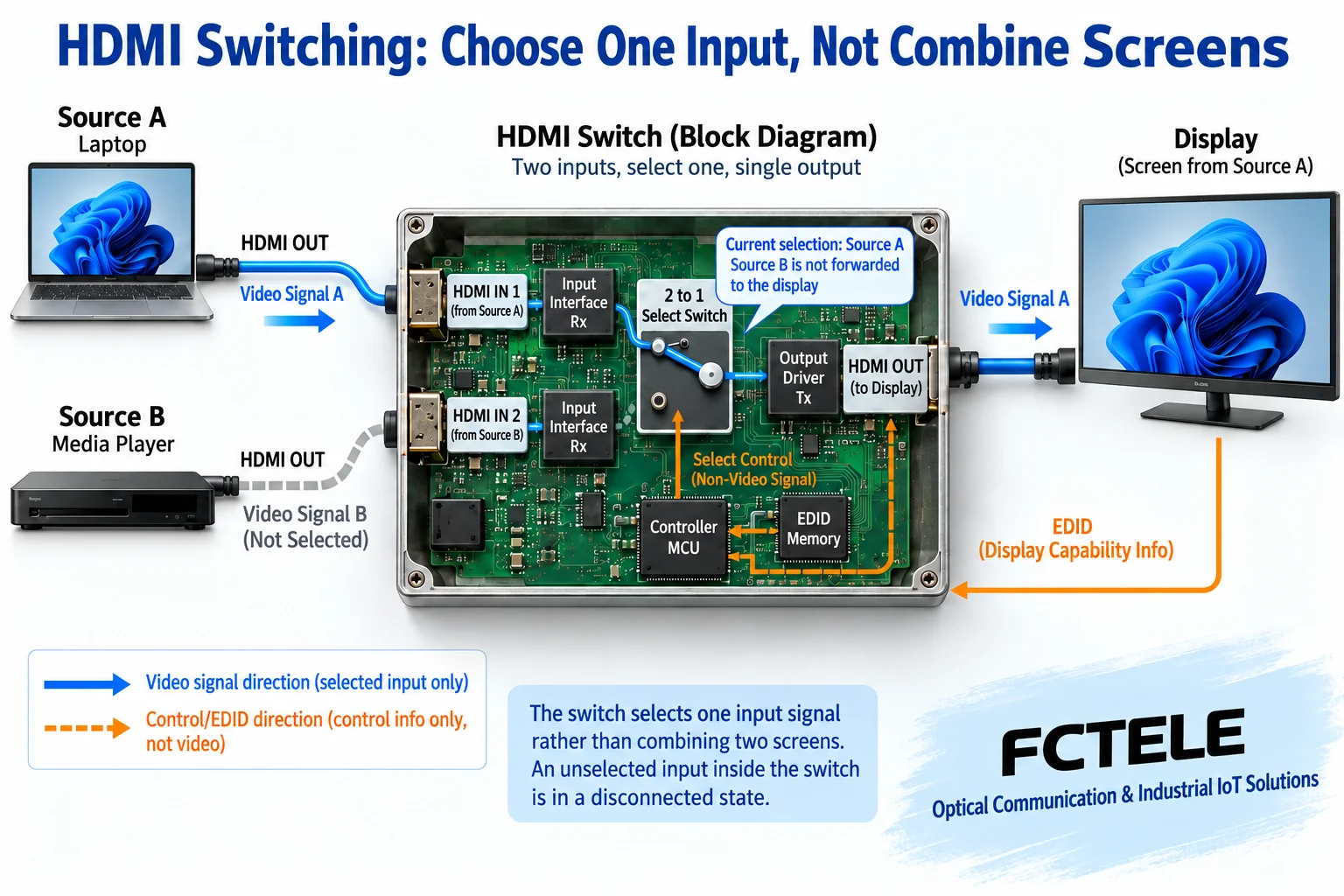
A common multi-input, one-output switcher selects one input and outputs it to one display. A splitter sends one suitable signal to multiple outputs. A matrix allows multiple inputs and multiple outputs to form different correspondences according to capability. The names are sometimes used interchangeably, so when purchasing you should fill in the number of inputs, the number of outputs, and whether each display needs to see the same or different content. You cannot infer simultaneous independent multi-screen display from a multi-input, one-output box.
If multi-window splicing, picture-in-picture or upscaling processing is also required, the device must explicitly provide the corresponding function. Simply selecting a path is not adding two pictures together, nor is it equal to re-creating video. When seamless switching is needed, you should ask even more specifically about the exact formats, synchronization and processing conditions. You cannot treat one switching time of a high-speed selection chip as the time for the complete display system to restore the image.
How signals are selected internally: the main path and control are handled separately
Using the earlier TMDS method as a teaching example, HDMI inputs have high-speed differential signal channels. The switching circuit selects the corresponding input, and then the output circuit sends the suitable signal to the display. Processing such as equalization can help meet specified signal conditions, but it does not mean any long cable can be repaired. Different models may also use receive, process and retransmit architectures, and the specific chip cannot be inferred from the appearance.
In addition to the main video path, HDMI also involves DDC communication and HPD status. DDC is the communication channel for exchanging information such as display capabilities. HPD is used to provide hot-plug-related status to the source. TI’s TMDS442 material shows that one switching implementation manages the corresponding video, DDC and HPD paths at the same time. This example shows that routing is not just passing through one video cable; chip capability is not the specification of any Feichang Technology complete unit, nor is it an internal diagram of all new interface mechanisms.
EDID affects source selection, but it is not a format converter
EDID is the capability description provided by the display, including the corresponding display and audio conditions. After the source device reads it, it decides the output together with its own settings. A switcher may forward capability information, or it may store, provide presets, or manage different display conditions according to instructions. The orange arrow in the figure returns from the display side to the source side, indicating the logical direction of information. It cannot be mixed with the forward video as the same task.
After changing the input or display, capability reading and status changes may cause the source to renegotiate; some systems therefore briefly show a black screen. A switcher maintaining EDID or providing presets also does not automatically mean it has scaling, color conversion or all-format output. Writing in a capability that a display cannot receive may make the source output the wrong mode. Confirm the current strategy and operate according to the manual. You cannot solve compatibility problems by continuously learning unknown data.
Version numbers cannot replace the complete video format
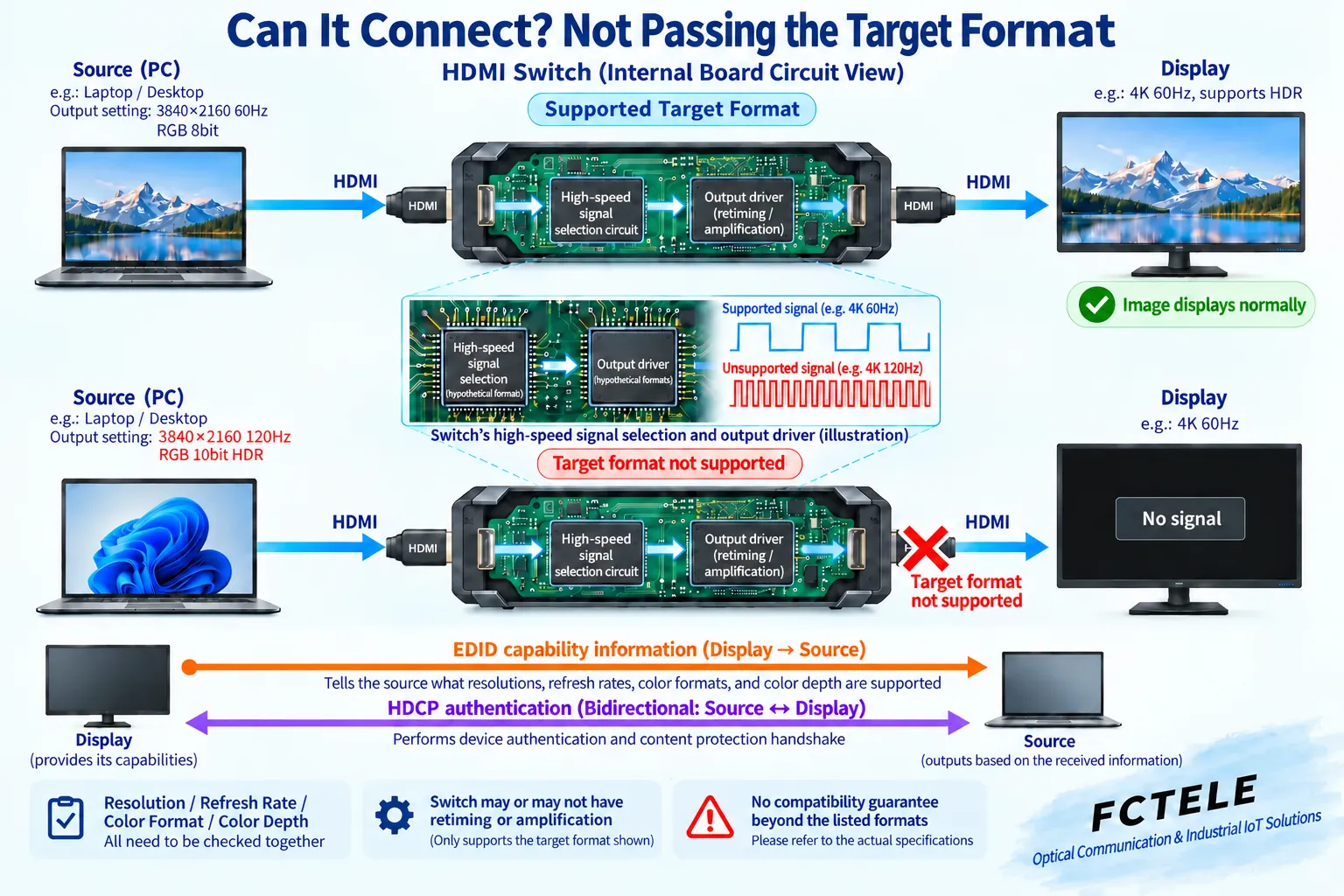
HDMI specification evolution defines different functions, but the implementation of a specific product must be checked clearly. You should check the exact resolution, refresh rate, chroma, bit depth and required features, and distinguish the conditions allowed at the input from those maintained at the output. The same word 4K does not prove that both 4K30 and 4K60 are supported. Being usable under one color condition does not prove that all combinations are usable. When a newer transmission mechanism is needed, you must also confirm that every segment of equipment and cable explicitly supports it.
The limitation may come from the switcher, a certain cable segment or the display. It cannot simply be called the whole link automatically running at the oldest version. Whether the source can reselect a mode is also affected by its implementation and settings. HDMI officially names cables by formal category. Using a qualified cable suitable for the required capability, length and installation conditions is more reliable than buying a so-called cable of a certain version. Bandwidth cannot be inferred only from plug material or cable thickness.
HDCP and audio must be confirmed independently
HDCP involves link authentication for applicable protected content. EDID describes display capabilities. The two cannot replace each other. The role and supported conditions of the switcher in this process require accurate materials. When a normal computer desktop works but a certain program shows a black screen, you should not directly judge that the optical path or cable is damaged; save the playback conditions and check the lawful supported combination of source, switcher and display. Do not treat bypassing protection as a general troubleshooting method.
Audio also requires confirming the source output selection, the formats supported by the switcher, and the playback capability of the receiving end. Picture without sound may be due to audio settings or capability mismatch, and is not necessarily a damaged switcher. Additional functions such as CEC device control, ARC or eARC audio return need to be checked item by item for direction. You cannot assume all are available just because an HDMI socket exists. When independent audio de-embedding is needed, choose a target that explicitly supports it.
When optical transceivers are added, every segment must hold
A switcher and an optical transceiver can appear in the same display solution, but routing and extension are different tasks. The internal capability of the optical transceiver, the EDID transfer method and the switcher strategy may jointly affect the source output, so the model and settings of each segment should be saved. Two devices separately supporting a certain maximum specification does not prove that all conditions can still hold at the same time after being connected in series.
The Feichang Technology FCM-H1-4k2 product page lists functions such as HDMI optical transmission and EDID return, which can serve as a basis for checking its extension segment; these capabilities cannot be rewritten to mean that the device has a multi-input matrix or seamless switching. The current verification did not obtain accurate model materials that could support an independent Feichang Technology switcher promise. For switching equipment, input/output, processing capability and support tables should be requested separately, and parameters from different products should not be combined.
Use two sources to build a reproducible test
Assume a meeting room has two computers and one screen. First let each computer connect directly to the screen with a short cable, and test picture, sound and actual applications in a mode explicitly supported by both sides. Then add the switcher and test each path with the same devices and cables, then test switching and recovery. If the installed system also has optical transmission or long cables, add them segment by segment and record at which step the abnormality occurs.
One path working normally does not prove that the other source supports the same output conditions. First use a commonly supported mode to establish a baseline, then restore the target settings item by item and save every change. If failure occurs only at a high specification or with a certain type of content, check bandwidth, timing, negotiation and authentication separately. Do not change the computer, change color, change cables and learn EDID at the same time, otherwise it will be hard to explain the cause even after recovery.
Write clear allowed variations in procurement and acceptance
The procurement table should note the number of inputs and outputs, actual sources and displays, complete video modes, audio, content protection and required control functions. Ask the manufacturer to explain whether there is processing and format change, and the actual behavior during switching. If you want all inputs to maintain the same output format, the device must truly have the corresponding processing capability; you cannot replace confirmation with just the words supports a new version.
Acceptance should cover each input path, agreed modes, moving images, sound, planned content and allowed power-on/off recovery. Record the number of switches, operation order, conditions under which black screen or loss of sound occurs, and the final configuration. Keep both successful results and limitations. A compatibility conclusion should target the already verified group of devices and objectives, and should not be expanded to mean that all old devices or future formats can interoperate.
Material note: The principle diagrams have been checked against technical content and are used to explain general mechanisms. They are not product photos or measured records. Specific interfaces, modes and capabilities are subject to the selected model, version and on-site verification.
Verification materials:HDMI official specifications and function descriptions
HDMI official cable categories
TI TMDS442 video and DDC, HPD switching mechanism
Feichang Technology FCM-H1-4k2 optical transmission product material
Related technical topics:How to connect an HDMI extender: differences between point-to-point network cable, fiber and IP networkHow to install and debug an HDMI optical transceiver: short-link pair testing, optical path access and acceptanceHow to choose an HDMI optical transceiver: complete video modes, optical path budget and auxiliary interfacesHow to plan a meeting room video optical transceiver: check HDMI display, USB capture and IP conferencing separatelyHow to choose between HDMI and VGA: digital interface, analog sampling, audio and conversion directionWill VGA to HDMI make the picture clearer: sampling, upscaling and real detailHow to check no picture or no sound from SDI to HDMI: power, lock and display compatibilityHow to convert SDI to HDMI: video format, embedded audio and power checkHow to troubleshoot black screen and flickering on HDMI video optical transceivers: format bandwidth, EDID and HDCPWhat is an HDMI optical transceiver: electrical-to-optical conversion, display negotiation and transmission boundariesHow to upgrade a video optical transceiver: different paths for analog surveillance, SDI, HDMI and IP networkHow to connect a video optical transceiver: interface boundaries of SDI, HDMI and network video
Translated from the Chinese technical article. Source first published: 2020-05-08. Source last revised: 2026-10-13T11:37:04+08:00. Read the Chinese source
